Calynza Founding members

Bookings held, not hoped.

Booking and payments for coaches, consultants and therapists

Calynza gives a coach, consultant or therapist a booking page in their own colours where clients pick a time, pay a deposit and get reminded. Calyx, the built-in assistant, drafts the next step, and the professional only has to tap yes.

Made forCoachesConsultantsTherapistsTutors

Runs onWeb

calynza.com
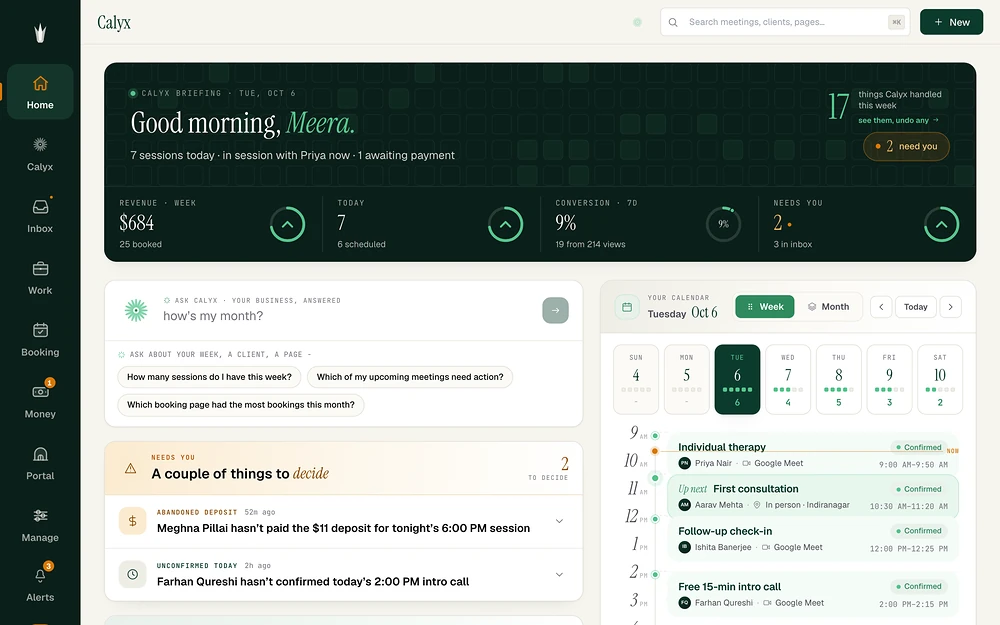
Calynza: Your day
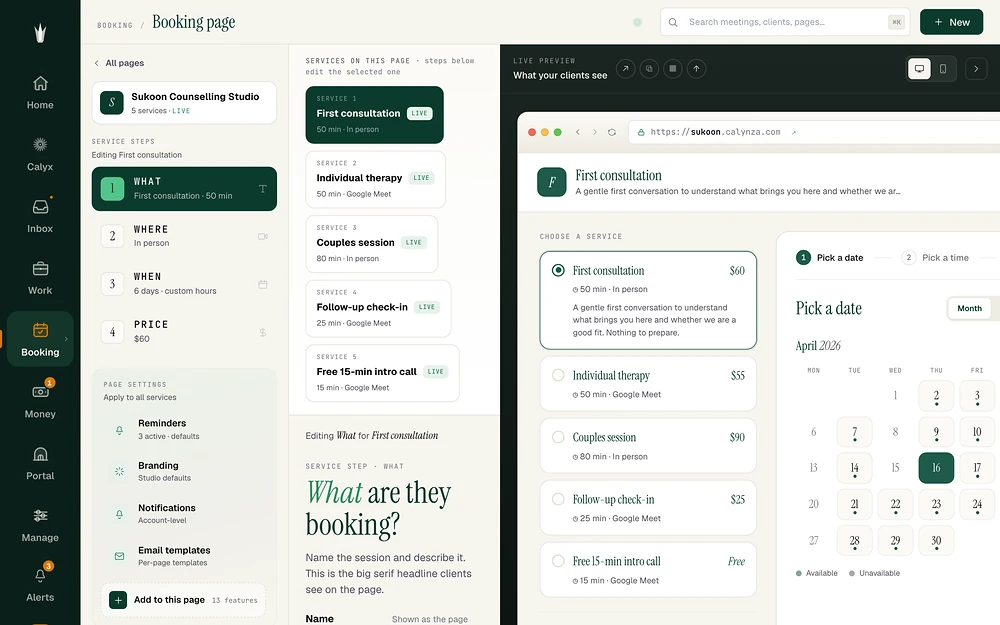
Calynza: Your page
Calynza: Booking page
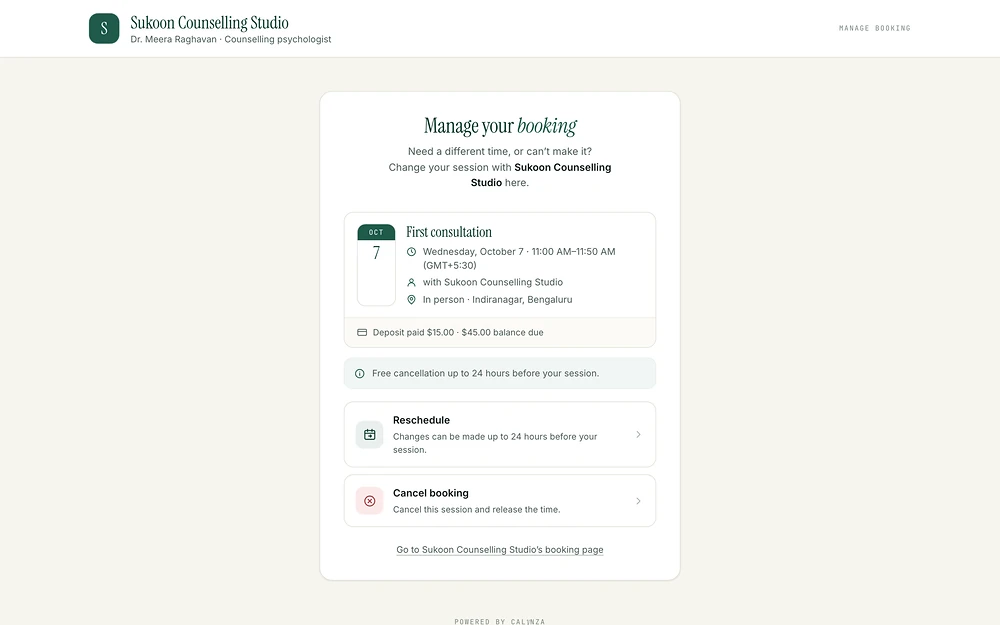
Calynza: Deposit

Today's sessions, deposits and who needs a call.

Build the booking page service by service, with a live preview beside you.

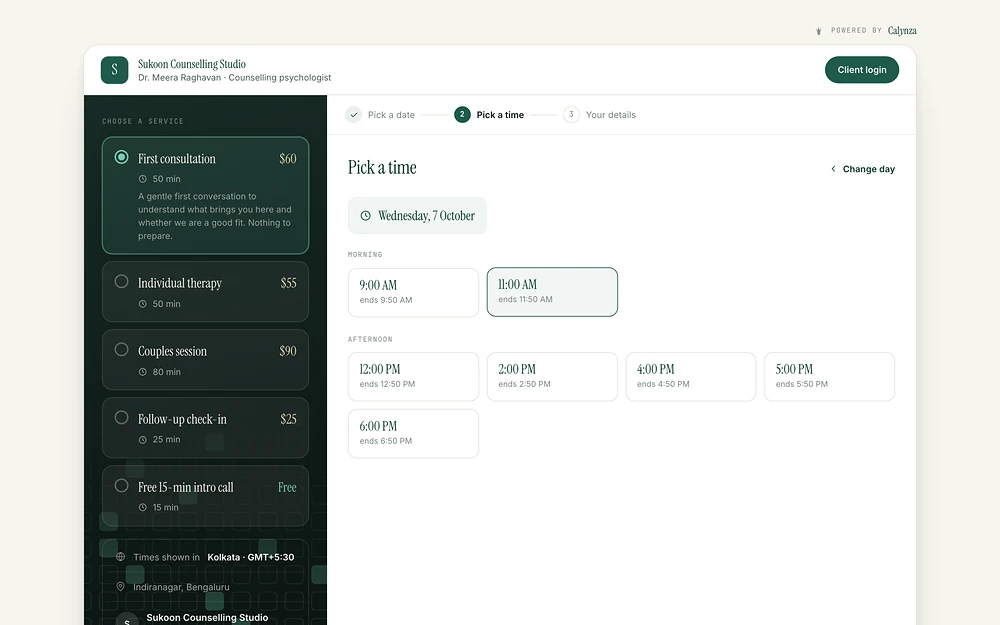
Your own branded link: clients pick a service and a time.

The deposit is paid at booking, and clients reschedule or cancel within your rules.

What changes · with Calynza

From how it wasto how it runs now

The difference a team feels in the first weeks, in plain words.

Chasing deposits by message
The deposit is taken when they book
An empty hour when someone does not show
Reminders, a deposit and a clear policy
Back-and-forth to move one session
Calyx drafts open times, you tap send
Invoices written late at night
Invoices with a pay link and a polite reminder
An assistant you cannot trust
You set how much it may do, job by job
The index · 7 highlights

You run the work.Calyx runs the rest

Seven moments from one practice. Open any of them, or let them turn.

  1. A page in your colours. Clients pick a time and pay a deposit to hold it.

    • Your own address, logo and colours
    • Times shown in the client's own zone
    • Zoom or Google Meet links made for you
    sukoon.calynza.com
    SC
    Sukoon Counselling StudioDr. Meera Raghavan · Counselling psychologist
    Client login

    Pick a date2Pick a time3Your details

    Pick a time

    Wednesday, 7 October

    9:00 AMends 9:5011:00 AMends 11:502:00 PMends 2:504:00 PMends 4:505:00 PMends 5:506:00 PMends 6:50
    Deposit due now to hold your slot$15The rest is charged automatically 24 hours before
    Pay $15

    You're booked. See you Wednesday at 11:00.

  2. Before you are up, the routine is done, and every action has an undo.

    • Confirmations, holds and reminders
    • Every action kept as a receipt
    • Undo anything Calyx did
    app.calynza.com/inbox

    05:58

    Tuesday, 6 October
    While you were asleep3 things handled · 0 need you
    • Confirmed Aarav's new booking11:42 PMUndo
    • Held Priya's deposit · $152:10 AMUndo
    • Reminded Ishita and 3 others5:30 AMUndo
  3. A client asks to move. Calyx drafts open times, you approve, and the deposit moves with them.

    • Drafts wait for your yes
    • Your cancellation policy applies
    • Clients manage from their own link
    app.calynza.com/home
    IB

    Could we move Thursday? Something came up at work.

    Calyx drafted a replyAsk first

    Of course, Ishita. I can offer any of these:

    Fri 10:00 AMFri 4:00 PMMon 11:00 AM
    Approve and sendEdit
    IB

    Friday at 4 works, thank you!

    Moved to Friday 4:00 PM. The deposit moved with it.

  4. Set each job to Just watch, Ask first or Handle it. Refunds and charges always wait for you.

    • Nine jobs, each with its own setting
    • It suggests a step up once it earns it
    • Irreversible actions are always drafts
    app.calynza.com/calyx

    Just watchAsk firstHandle it

    Moving meetings is set to Ask first
    What Calyx doesNine jobs, set one by one
    • RemindersHandle it
    • Deposits and holdsHandle it
    • ConfirmationsHandle it
    • Moving meetingsAsk first
    • InvoicesAsk first
    • Follow-upsJust watch
    • Refunds and chargesAlways you

    Calyx is ready to handle invoices: 12 approved, none edited

  5. Invoices with a pay link. When one goes quiet, Calyx drafts a kind reminder for you to approve.

    • Line items, tax and a PDF
    • A pay link straight to your Stripe
    • Reminders you approve in one tap
    app.calynza.com/money
    Sukoon Counselling StudioINV-0042

    Billed toAarav Mehta

    Individual therapy × 2
    $110
    Tax
    $10

    Total$120

    Unpaid · 3 daysPaid
    Calyx drafted a reminder

    Hi Aarav, a gentle note that last week's invoice for $120 is still open. Here is the link whenever suits you.

    Approve reminder

    Paid by card · $120

  6. Questions about how a client feels, medication or a diagnosis always come to you, untouched.

    • Choose a tone: warm, plain or clinical
    • Choose topic by topic who answers
    • Correct an answer and it learns your words
    app.calynza.com/calyx/voice
    Voice & boundaries
    WarmPlainClinical
    • Scheduling and timesCalyx answers
    • Prices and packagesCalyx answers
    • How a client feelsPass to you
    • MedicationPass to you
    • DiagnosisPass to you
    FQ

    Should I change my medication dose before our session?

    Locked to you
    Meera's inboxFarhan Qureshi asked a question for you

    Calyx did not reply. It is waiting for you.

  7. Calyx's briefing, what needs a decision, and your week, the moment you sign in.

    • What Calyx handled this week
    • Two decisions, not twenty notifications
    • Ask Calyx about your own numbers
    app.calynza.com/home
    Calyx briefing · Tue, Oct 6
    Good morning, Meera.

    7 sessions today · in session with Priya now · 1 awaiting payment

    17things Calyx handled this week
    Revenue · week$68425 booked
    Today76 scheduled
    Needs you23 in inbox
    Needs youA couple of things to decide
    • Abandoned depositMeghna hasn't paid the $11 deposit for tonight's 6:00 PM
      Remind
    • Unconfirmed todayFarhan hasn't confirmed today's 2:00 PM intro call
      Nudge
    Sun4Mon5Tue6Wed7Thu8Fri9
    1. Individual therapyPNPriya Nair · Google Meet
      Confirmed
    2. First consultationAMAarav Mehta · In person
      Confirmed
    3. Follow-up check-inIBIshita Banerjee · Google Meet
      Confirmed
See all 63 features54 live · 9 soon
11

The booking page your clients see

  • Branded booking page: a page on your own yourname.calynza.com address with your logo, accent colour and a chosen font pairing.
  • Several services per page: each with its own name, description, length, location and price, built step by step (What, Where, When, Price).
  • Three calendar layouts: Month grid, Day list, or Agenda.
  • Time-zone-correct times: clients see times in their own zone, labelled on the page.
  • Where the session happens: Zoom, Google Meet, phone, in person, a pasted link, or decide later; the video link is created for you.
  • Live preview while editing: the editor shows the real page as you change it.
  • Custom confirmation screen: your own headline and message after booking.
  • Client space on booking: after booking, the client verifies a 6-digit email code and lands in their own portal.
  • Self-serve manage, reschedule and cancel: signed links in every email open pages that show the booking and apply your policy.
  • Pause, duplicate or delete a page: a paused page tells visitors it is unavailable.
  • Share card and copy link: from the booking pages list.

09

Availability and scheduling rules

  • Weekly hours: set once per page.
  • Time off and special hours: block a day or a stretch, or open different hours on one date, across every page.
  • Google Calendar sync: busy times block slots so nobody double-books you.
  • Outlook / Microsoft 365 sync.Soon
  • Daily booking limit: cap sessions per day.
  • Buffers before and after, minimum notice, custom lengths up to 8 hours, start interval (on request).
  • Group sessions: several people in one slot, with "N spots left" on the page (on request).
  • Recurring series: clients book weekly, fortnightly or monthly sessions in one go, paid once, and cancel this, following or all (on request).
  • Slot hold at checkout: the time is held while the client pays, then released if they don't finish.
08

Money

  • Four ways to charge: free, full payment, deposit (a percentage, balance charged automatically about 24 hours before), or pay after.
  • Your own Stripe: payouts go straight to the professional's Stripe account; 3-D Secure cards supported.
  • Cancellation policies: Flexible, Standard (full refund before a deadline you set) or Strict, shown to clients before they book; refunds run automatically.
  • Session packages: clients buy a bundle (2 to 100 sessions, optional expiry), book against their balance and see "sessions left".Soon
  • Invoices: line items, tax, notes, due date, PDF attached, a Stripe pay link, duplicate, mark paid, reminders, CSV export, linked to sessions.
  • No-show handling: mark a no-show from the meeting; Calyx can prepare the no-show charge for approval.
  • Failed charge retry or waive: from the Inbox.
  • Coupons.Soon
05

Reminders and client emails

  • Email reminders: 24 hours, 1 hour and 30 minutes before, plus your own extra reminders.
  • Editable email templates: confirmation, reminders, reschedule, cancellation, follow-up and refund, with personal fields like {{client_first_name}}.
  • Notifications to you: new booking, move, cancel, payment, a no-show flag, and a morning digest of the day ahead.
  • SMS reminders with consent.Soon
  • Intake forms and e-sign agreements: per-service questions with conditions, a typed signature turned into a signed PDF, collected before or after booking or with a package.Soon
12

Calyx, the assistant

  • Home, "what needs you": a short list of decisions, what Calyx is watching, and the shape of your week.
  • Capabilities ladder: nine jobs (reminders, deposits and holds, confirmations, moving meetings, no-show charges, invoices, follow-ups, re-engaging quiet clients, answering portal questions), each set to Just watch, Ask first or Handle it.
  • Earned trust: after enough approvals without edits, Calyx suggests moving a job up a level.
  • Inbox of receipts: everything Calyx did, with Send, Undo, "Ask me first next time" and "Teach me".
  • Ask Calyx (Cmd+K): ask "Who am I meeting tomorrow?" or "Which page had the most bookings this month?" and get an answer from your real data.
  • Knowledge: tell Calyx about your practice, upload a document (PDF, Word, text) or paste a web page; it turns them into cards you confirm, each marked public or private.
  • Voice & boundaries: pick a tone (warm, plain, clinical), choose per topic whether Calyx answers or passes it to you, and correct any answer so it learns your wording.
  • Conflicts with a fix attached: collisions flagged with Calyx's suggested fix and the guard that would stop the next one.
  • Protections: prevent double-booking, require a buffer, warn on 3+ back-to-back sessions, warn on client time-zone changes, auto-draft an apology to both clients on a collision.
  • Notifications drawer: what Calyx handled and what still needs you.
  • Getting-started checklist: create a page, connect your calendar, connect Stripe, share your link.
  • Type a meeting in plain words.Soon
07

Clients and the client portal

  • Client list: built from your bookings, with tags, notes, search, segments, book-for-client and branded email.
  • CSV import and export: map columns, sample file provided.
  • Client portal: clients sign in with an emailed code or a password and see all bookings, past sessions, payments and invoice PDFs, packages, and intake and agreements.
  • Website builder ("Client pages"): pick one of nine designed templates, answer three questions, and Calyx fills the site with your services and brand; edit blocks (hero, text, services, booking, contact, form, numbers, testimonials, gallery), set SEO, publish at your subdomain.
  • Leads: website form entries land in a Leads page and your email.
  • Calyx Concierge: a chat on your published site that answers visitors from your public knowledge and hands anything else to you with a lead form (paid plans).
  • Ask Calyx for clients.Soon
04

Your work, at a glance

  • Meetings: Upcoming, Unconfirmed, Past and All, filtered by host and status (including "Awaiting deposit").
  • Meeting drawer: details, intake answers, booking value, activity timeline, reschedule with live slots, cancel with automatic refund, confirm, no-show, email the client.
  • Analytics: bookings over time, conversion from page view to "shown up", no-shows, deposits and per-page performance.
  • Global search: meetings, clients and pages from the top bar.
07

Team, integrations and account

  • Team with roles: owner, admin and member, invites, role changes.
  • Integrations: Google Calendar, Zoom, Google Meet, Stripe.
  • Webhooks, API keys and Zapier: signed events for booking created, moved, cancelled, no-show, intake done, package bought, payment received.Soon
  • Import from Calendly or Acuity: event types, weekly hours, upcoming bookings and clients in one wizard.Soon
  • Plan & usage, Billing: in-app plan change, trial status, usage meters.
  • Help & support tickets: a person on the Calynza team replies in the app and by email.
  • Sign in with email or Google, 30-day sessions, account deletion with a 30-day grace period.
Who it's for · 5 kinds of team

Built for the people whoare the business

Each one books time, and each one hires Calynza for a different job.

Coaches

Sell session packages up front and keep sessions booked with deposits and reminders.

Consultants

Discovery calls with booking questions, a Google Meet or Zoom link made for you, and invoices from the same place.

Therapists and counsellors

A quiet, private booking flow and an assistant that never touches clinical questions.

Studios and freelancers

Deposits on scope calls, a shared client list and a team with roles.

Tutors and teachers

A cancellation policy enforced at booking, and a portal where families see their bookings.

How it works · 4 steps

From sign-upto the first booking

Free to start, no card needed.

  1. 01

    Sign up free

    Email or Google, tell Calynza what you do. No card needed.

  2. 02

    Build your page

    Add your services, hours, prices and colours. Connect Google Calendar so busy times stay blocked, and Stripe to take deposits.

  3. 03

    Share your link

    Put yourname.calynza.com in your bio, email or website. Clients pick a time, pay, and get reminded.

  4. 04

    Let Calyx take the routine

    Approve its drafts from Home or the Inbox in one tap, and move a job to "Handle it" once you trust it.

Under the hood · what it stands on

Built to betrusted

Your own Stripe
Payments go straight to your Stripe account, in 22 currencies, with 3-D Secure.
Held, not hoped
A slot is held while the client pays and released if they do not finish.
Drafts for anything final
Refunds and charges are always drafts, whatever the setting, and every action has an undo.
Calendars that agree
Google Calendar busy times block your slots, and video links are made for you.
Private by design
Connected accounts are encrypted, and client pages open from signed links.
A person who answers
Support tickets are answered by someone on the Calynza team.
Built by SanctumCloud · the same team

The servicesit proves

We designed, built and run Calynza. The same people do this work for clients.

SaaS product engineering

From idea to a product people pay for.

Generative AI applications

Assistants that answer from your own data.

Web applications

Fast, secure web apps that grow without a rewrite.

UX/UI design

Products people understand at a glance.

CalynzaBuilt by SanctumCloud

Want a productlike this one?