Dhanest Live

Every company you run. One clean set of books.

Books, GST, payroll, stock and orders for Indian businesses

Dhanest keeps the books, invoices, GST, payroll, stock, production and orders of one company or several in a single system. A sale raises the invoice, moves the stock, books the GST and shows up on the owner's morning screen, on the web and on the phone.

Made forMakersTradersDistributorsAgenciesClinics and shops

Runs onWeb · iPhone · Android

dhanest.com
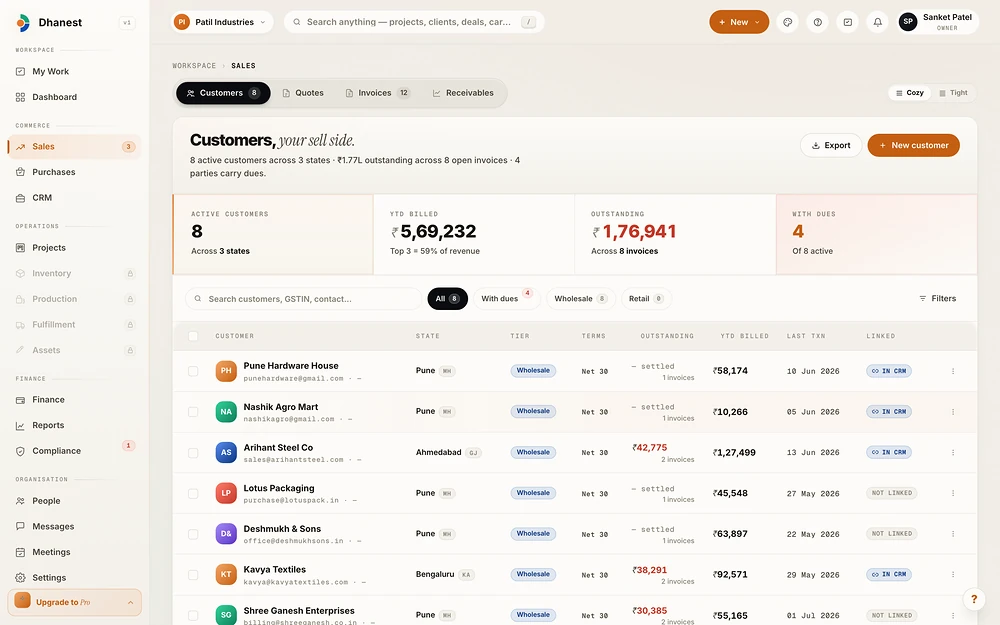
Dhanest: Sales
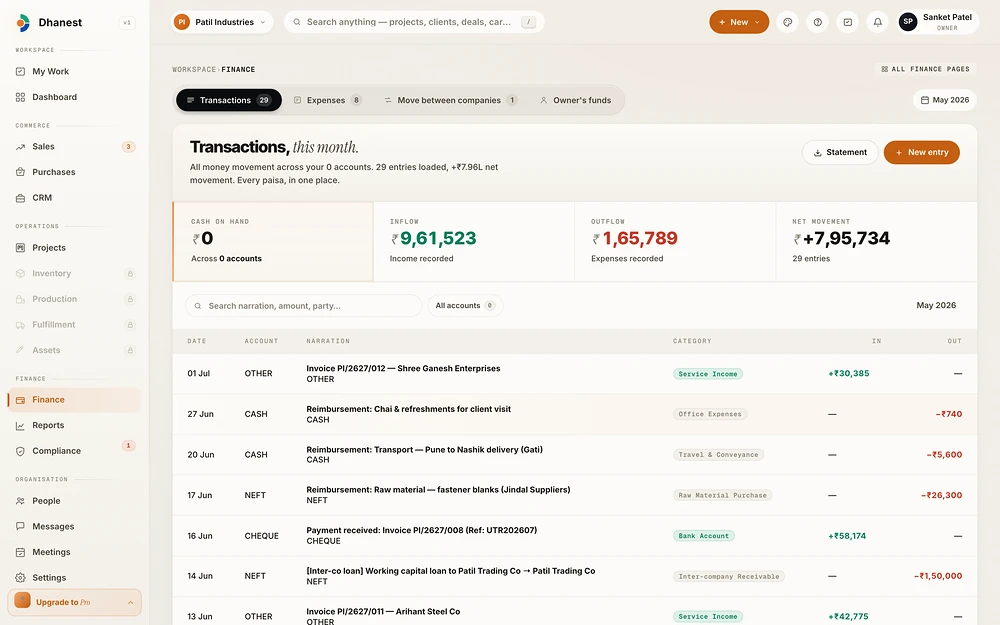
Dhanest: Money
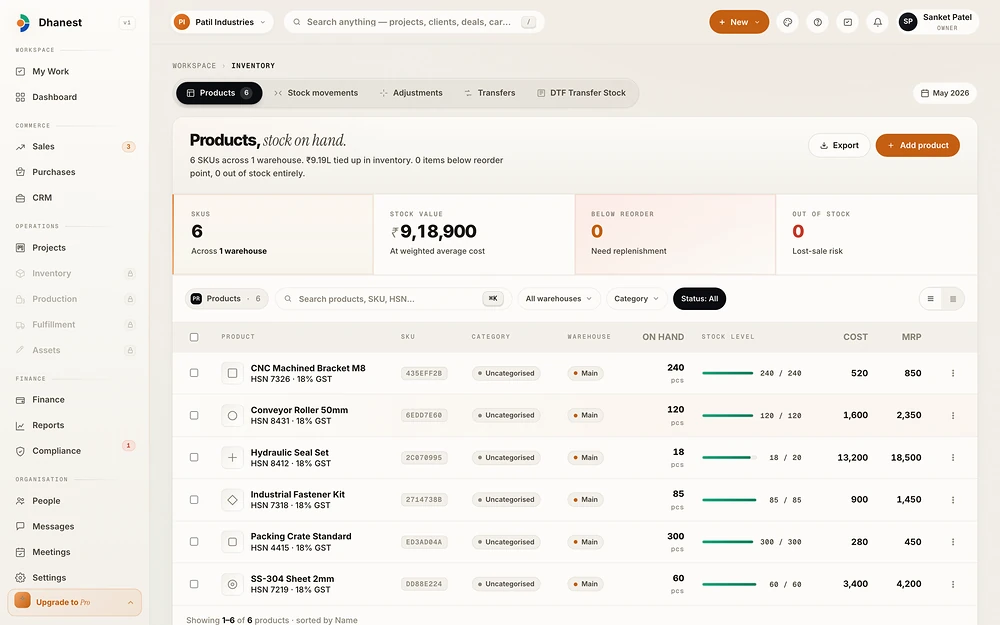
Dhanest: Stock
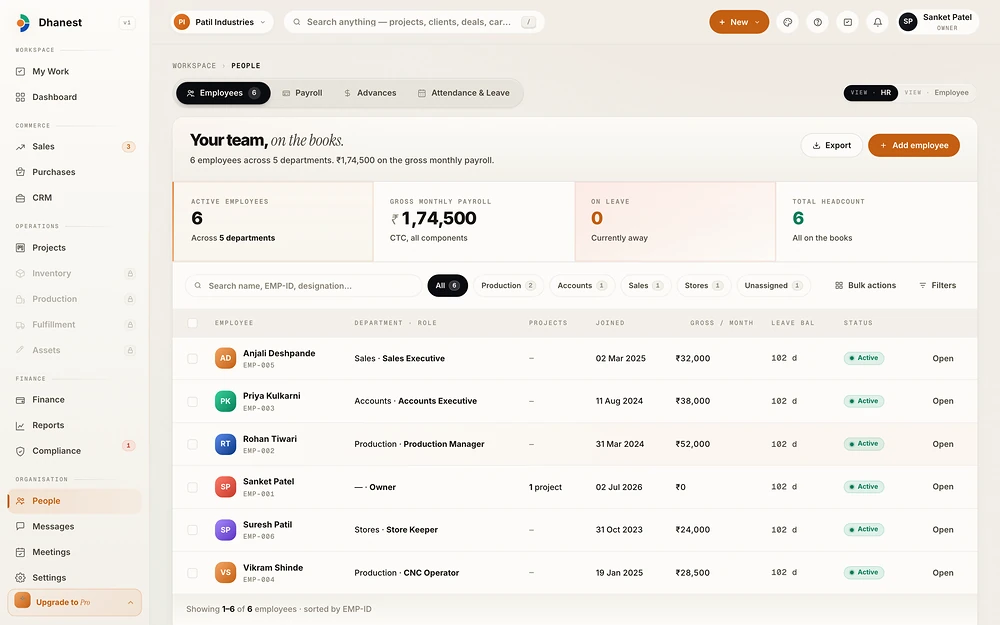
Dhanest: People
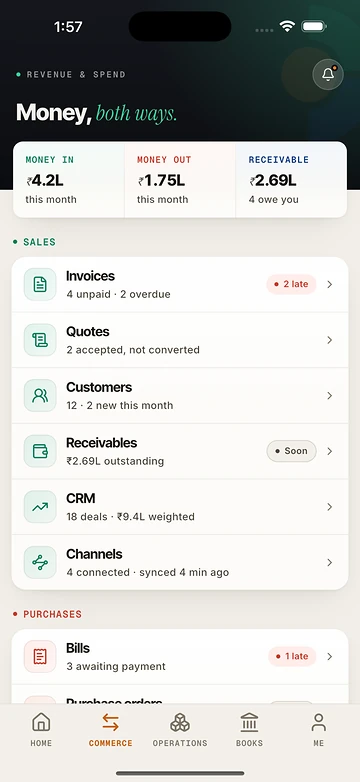
The Dhanest phone app: money in, money out and who owes you

Customers, quotes and invoices, and exactly who owes what.

Every rupee in and out across banks and cash, on one ledger.

Stock on hand in every warehouse, valued at cost.

The team, payroll, attendance and advances, on the books.

What changes · with Dhanest

From how it wasto how it runs now

The difference a team feels in the first weeks, in plain words.

A separate Tally and Excel sheet for every company
Every company in one sign-in, on one ledger
GST, salaries and the stock count take days every month
Returns, payroll and stock come straight from the books
The real work happens in a WhatsApp group
Team chat sits on the order it is about
A bag of bills for the CA at year end
One zip with every bill and invoice attached
Nobody is sure the numbers match
A sale moves stock, GST and the dashboard together
What it does · 9 highlights

The parts teamsuse every day

The features that change a working day, shown working. Every other feature is one tap below.

Sell once. Everything moves.

The invoice, the stock, the GST and your dashboard, in one go.

Many companies, one login.

Money between them is booked on both sides.

Snap a bill.

AI reads it, even in Gujarati.

GST, portal-ready.

Returns built straight from your books.

Payroll as it happens.

Part payments are normal here.

The floor counts itself.

Scan, count and keep going, even offline.

Every order, one queue.

Shopify, your shop and direct orders, together.

Month-end in one zip.

Every bill and invoice, ready for your CA.

Speaks your trade.

Twelve business types, each in its own words.

See all 203 features200 live · 3 soon
28

Money, books and reports

  • One ledger for everything: every sale, bill, expense, salary and transfer posts to one double-entry ledger, with money in, money out and transfers as simple tiles.
  • Journal vouchers: post a balanced multi-line entry when the books need a manual touch.
  • Opening balances: start from your old books (the first step of a move from Tally).
  • Chart of accounts and cost centres: your own account heads, plus cost centres when a company has more than one.
  • Recurring vouchers: rent, retainers and other repeat entries post themselves on schedule.
  • Void, never delete: a posted entry is voided with a reason and a reversal, so the record stays honest.
  • Receipts on every entry: attach the bill or photo to any transaction.
  • Bank and cash accounts: each with its own balance, statement and a default account.
  • Bank reconciliation: lay statement lines beside the books, auto-match, link, ignore and close the session.
  • Cheque register: track every cheque issued and received through its life.
  • Budgets with variance: set a budget per head and see actual against plan.
  • Inter-company transfers: move money between your companies in one step, with both sides booked together, then settle what each company owes the other.
  • Who owes whom: each company's inter-company receivables, payables and net position.Soon
  • Owner's funding and loans: record money the owner puts in or takes out, per person, with a loans summary.
  • Personal entries kept out of reports: an owner can mark an entry personal and it never touches the financial reports.
  • Period lock: close a period so nothing changes behind the accountant's back.
  • Morning dashboard: cash, receivables, aging, cash flow, GST due and quick actions on one screen.
  • Statements: profit and loss, balance sheet, cash flow and trial balance.
  • Books: day book, cash book, bank book, ledger, sales, bill and expense registers.
  • Income and expenses with proof: every sale and expense listed with its proof, missing proof flagged, and cash expenses above ₹10,000 called out.
  • Download for CA: one zip with the register, a "missing proof" list and every bill and invoice file.
  • Invite your CA: give the accountant time-limited access to the businesses you choose.
  • Group view across companies: compare entities side by side.
  • Outstanding: receivables and payables aging.
  • Analytics: ratios, income and expense analysis, sales by SKU, customer and vendor analysis, retention, channel performance, fulfilment speed, pipeline forecast, win/loss and project profitability.
  • Stock reports: stock value, slow-moving, dead stock, stock aging, reorder list, ABC analysis and production summary.
  • Saved views and scheduled reports: save a report your way and have it run and delivered on a schedule.
  • Report library: every report in one searchable place.
19

Selling and getting paid

  • Customers: one party record per customer with GSTIN, credit limit, contacts and notes.
  • GST-correct invoices: the invoice decides IGST or CGST plus SGST from the customer's state and carries HSN/SAC codes.
  • Invoice PDFs: generated in the background, downloadable, printable and emailed from the app.
  • Invoice Studio: design how your invoice looks, with a live preview.
  • Reminders and receivables: see who owes what, age it, and send a reminder in one click.
  • Overdue check every night: invoices past due are flagged automatically at midnight IST.
  • Receipts and part payments: record payments, apply credit and settle several invoices at once.
  • Credit notes and debit notes: raise them against the original invoice or bill.
  • Quotes that convert: send a quote, let the customer accept it on a public link, then turn it into an order or invoice.
  • Estimator (configure, price, quote): build a price template with options, quantity slabs, discounts and shipping, so a salesperson picks options and the price works itself out.
  • Price approvals: an order priced below the system price waits for a manager's approval.
  • Sales orders: take an order with advance payment; the advance lands on the invoice when it is posted.
  • Services catalogue: a menu card of services with prices and GST, for businesses that sell time, not stock.
  • Recurring billing: customer subscriptions that renew and bill themselves, with plan changes.
  • Price lists and schemes: different prices per customer group, and buy-X-get-Y or slab schemes.
  • Field sales on beats: plan a salesman's route, record each shop visit and take the order on the spot.
  • Claims to the principal: build, print, submit and settle scheme claims, with secondary sales reports by brand.
  • Counter (POS): open a shift, sell by scan, take cash, UPI or card, exchange, return or void, and close with a cash count.
  • Counter reports: day report, register print, shift report, loyalty, and for pharmacies a Schedule H register, doctors report and expiring-stock list.
13

Buying and expenses

  • Suppliers: one record per supplier with bills, payments and returns.
  • Purchase orders: raise, send as PDF, resend, and close short.
  • Receive goods (GRN): receive against a PO at the gate and the stock goes up.
  • Supplier bills matched to the order: record the bill and link it to its purchase order before paying.
  • AI reads the supplier bill: photograph or upload a bill and AI fills in the supplier, amounts and tax.
  • Pay bills and supplier returns: record payments, raise debit notes and print a return note.
  • Vendor GST filing status: check whether your suppliers filed their GSTR-1 for the period.
  • Expense claims: staff claim an expense, attach the bill, and it goes for approval.
  • Snap a bill: photograph a bill and AI reads vendor, date and amount, even on Gujarati or Hindi bills.
  • Approve, bulk approve and reimburse: approvals post straight to the ledger; you cannot approve your own claim.
  • Duplicate warning: a claim that looks like one already filed is stopped and asked about.
  • Claims paid from an advance: settle an expense against money a staff member already received.
  • Import expenses: bring in a CSV of past expenses.
18

GST and compliance (India)

  • GSTR-1: prepare, check, edit and amend the return, and download the JSON the GST portal takes.
  • GSTR-3B: a preview of the monthly summary with net liability.
  • GSTR-9 annual return: the yearly return built from the year's books.
  • CMP-08 and ITC-04: the composition quarterly statement and the job-work return.
  • ITC reconciliation with 2B: upload GSTR-2B and match every supplier invoice, then accept or chase each one.
  • Reverse charge working: see what tax you owe under RCM.
  • Several GSTINs per business: register each state separately and file each one.
  • HSN catalogue and audit: an HSN list with rates, and a check that flags items with missing or wrong codes.
  • Tax payments and challans: record challans and mark them paid.
  • Filing dashboard: every return, its due date and its status in one place.
  • e-Invoice and e-way bill registers (portal-ready): Dhanest builds the complete INV-01 and EWB-01 JSON, flags anything missing, and keeps the register once you paste the IRN or EWB number back. A direct link to the portal is coming.
  • TDS on vendors: record deductions by section, track deposits, and export the 26Q file.
  • TDS receivable: track tax your customers deducted from you and mark certificates received.
  • TCS credit from marketplaces: paste the portal statement and accept or reject each marketplace's TCS credit.
  • Payroll statutory figures: PF, ESI and salary TDS (24Q) worked out from payroll. Professional tax by state is coming.
  • GST pack, books pack and compliance pack: one-click packs for the accountant, with email to the CA.
  • Audit trail: who changed what and when, kept 30 to 90 days by plan.
  • Compliance calendar for a practice: a CA or consultant tracks each client's statutory due dates, tasks, document requests, DSC register and engagement letters.
26

People, payroll and teamwork

  • Employee files: details, documents, photo, reporting line and salary history.
  • Attendance with a geofence: staff punch in on the phone only inside the work site, and the phone takes the location only at the tap.
  • Work from home requests: ask, approve, end.
  • Muster roll: the month's attendance for everyone on one sheet.
  • Holidays: a holiday list per company, with import.
  • Leave: leave types and policy, balances, requests, a team inbox and a team leave calendar.
  • Payroll runs: start the month, check, process, recompute and complete; the month is set up automatically on the 1st.
  • Payslips: a proper payslip PDF with earnings, deductions, employer PF and year-to-date.
  • Bank salary file: download the NEFT file for the bank in one click.
  • PF and ESI: statutory deductions worked out per employee.
  • Wage register and Form 16: the wage register and each employee's Form 16.
  • Salary revisions and variable pay: revise salary with history, and add variable pay.
  • Commission from appointments: salon and clinic staff commissions flow into payroll.
  • Staff advances: types, request, approve, disburse, settle against salary or expenses, bulk advances.
  • Full and final settlement: the leaving employee's dues worked out and paid.
  • Contract labour: contractor rates, daily sheets and a bill from each sheet.
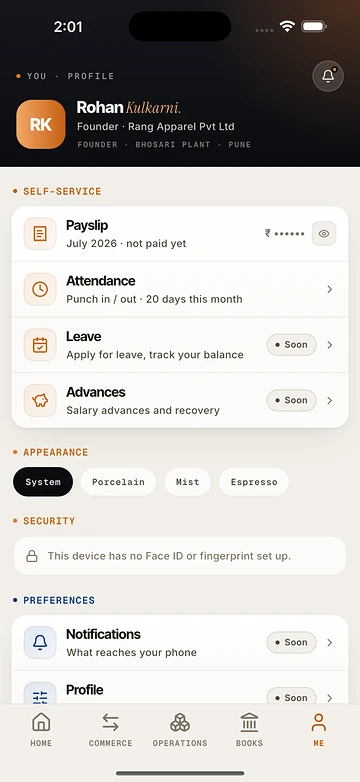
  • Self-service: every employee sees their own payslips, Form 16, attendance, leave and advances, without HR rights.
  • My Work: your tasks and what waits on you, in one list.
  • Approvals inbox: expenses, leave, advances, designs and stock adjustments to approve, in one place.
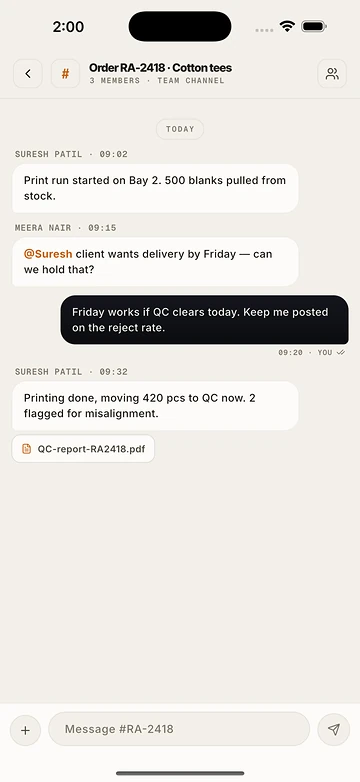
  • Team chat: channels and direct messages with mentions, reactions and read ticks, tied to the orders and projects they are about.
  • Meetings: schedule, take notes, and turn action items into cards.
  • Notifications: in-app, email and phone push, with each person choosing what reaches them.
  • Daily reminders: reminders go out at 9:00 IST.
  • Search and quick add: press / to search across the business, and ⌘K to add anything from anywhere.
  • Who answers for what: a register of responsibilities across 11 areas.
  • Document library: company documents in one place.
43

Stock, the factory and dispatch

  • One catalogue, three kinds: products, services and raw materials live in one catalogue, each with its own screens and pickers.
  • Variants and pictures: sizes, colours (including two- and three-colour combos) and a picture per variant.
  • SKUs and barcodes: one SKU per variant, scan to find, and print labels.
  • Stock health: what is low, what is out, what to reorder.
  • Stock ledger and movements: every in and out with its reason.
  • Locations and bins: many warehouses (godowns), a bin layout, and put-away suggestions.
  • Transfers: move stock between locations.
  • Stock counts: count shelves and post the difference, with approval on adjustments.
  • Batches, serials and expiry: track lots and serial numbers, with an expiry report.
  • Stock valuation: weighted average cost and the value on hand.
  • Bundles: sell a kit made of other items.
  • Purchase units: buy in rolls or kg and stock in the unit you use.
  • Planning: net requirements and replenishment suggestions.
  • Recipes (bill of materials): what goes into each product, by size, and what it costs.
  • Production orders: one order for several variants, with lines by size and colour.
  • Cut by palla: plan cutting by fabric layers and a size ratio, then record what was actually cut. Switched off until the owner turns it on.
  • Production lanes: cutting, stitching, printing, finishing, QC and packing each record their counts on a job card, and a manager verifies.
  • Job cards with a barcode: print a card per order and scan it at every step.
  • Methods and jobs: define how things are made and track each job.
  • QC inspections and repairs: pass, fail or send for rework, with a repair queue.
  • Job work: send material to an outside worker on a challan, record transport and what comes back.
  • Design stock and DTF transfers: for print businesses, track printed transfer stock by design, cut, count and write off.
  • The floor page: what is on the floor right now, by stage.
  • Orders in one queue: direct, shop and marketplace orders land in one order book.
  • The order board: accept, plan or hold each order and see the next step in plain words.
  • Packing desk: pick, press, pack and hand over, each step a scan.
  • Print planner and print runs: batch print jobs and track each run.
  • Design proofs to the customer: send a proof and get the customer's approval before printing.
  • Shipments: create a shipment from ready pieces, with courier, AWB and COD, and print the label.
  • Courier booking through Shiprocket: book shipments with the courier aggregator.Soon
  • Pickups and manifests: schedule a courier pickup, file the manifest and record the handover.
  • Tracking page for the customer: a public link to follow the parcel.
  • Returns and RMA: receive returns, grade each piece (A grade, B grade, repair, waste) and refund, exchange or restock.
  • COD remittance matching: match courier COD payouts to orders line by line.
  • Customer-owned stock: hold stock that belongs to a customer and return it.
  • Service orders: orders for work, not goods, marked ready when done.
  • Marketplace connections: connect a store and Dhanest tests the keys before saving them.
  • Shopify (live): orders sync every five minutes and by webhook, listings import and map to SKUs.
  • Myntra, Flipkart and Amazon: orders, listings and settlements from each marketplace, with Meesho and AJIO to follow.Soon
  • Listings and stock push: see every listing per channel and push stock out.
  • Blocked orders: an order whose SKU is unknown waits, then lands by itself once the SKU is added.
  • Channel dispatch, returns and settlements: dispatch board, pull returns, pull settlements and match the money.
  • Sync activity: every sync job and its result, in plain words.
26

Clients, projects and appointments

  • Deal pipeline: deals move across stages and are won, lost or reopened.
  • Contacts and clients: one record per client with activity.
  • Duplicate finder: catches the same person entered twice.
  • Client onboarding: a checklist, documents and an agreement for each new client, with a public link to complete it.
  • Client portal: clients see their invoices, quotes and files on a private link.
  • Client file links: ask a client for documents or decisions on a link and collect their uploads.
  • Projects: members, files, calendar and profitability per project.
  • Milestones to invoices: bill a milestone in one click, and send the client a sign-off link first.
  • Timesheets: log time, submit, approve and bill it; see utilisation.
  • Retainers: draw down a retainer and invoice when it runs low.
  • Contracts and SOWs: write, send and get a contract accepted online, with change orders.
  • Brand hub: a client's brand voice and rules, section by section, approved by the client.
  • Content board and calendar: plan content cards on a board and a calendar across clients and campaigns.
  • AI caption help: AI drafts captions and hashtags from the brief and the brand voice.
  • Design library: every design with its files, versions, categories and tags.
  • Design pipeline with review: each design moves through design, mockup and listing; finishing the last stage sends it for review, and a rejection reopens the stage with the comment.
  • Listing SKUs per marketplace: each design carries its SKU and its own SKU on every marketplace it is listed on.
  • Shared folders: share a folder of designs.
  • The book: a day and week book of bookings across staff and rooms, move or bill a booking.
  • Online booking page: customers pick a service and a free slot and book themselves.
  • Live queue board: a screen that shows who is next.
  • A file per person: notes, prescriptions, lab orders and lab results per patient or guest, with dispensing.
  • Workshop job cards: vehicle files, a job card the customer approves on a link, parts orders and an invoice.
  • Packages and memberships: sell a package of sessions and track what is used.
  • Resources and templates: staff, chairs or rooms as resources, and note templates.
  • The day and commissions: a day report and a staff commission report.
30

Website, shop and running many businesses

  • Website builder (Site Studio): build and edit the business's website, page by page, with a live preview identical to the published site.
  • Templates: start from a designed template, or save your own site as a template.
  • AI writes and edits the site: AI writes pages, tailors a template to the business, makes a change you describe, fixes SEO, and can be undone.
  • Publish, versions and restore: publish in one click and roll back to any earlier version.
  • Own domain: connect the business's own domain.
  • 16 add-ons: Shop, Booking, Coupons, WhatsApp chat, Offers bar, Pop-up, Reviews, Share buttons, Social previews, Site analytics, Newsletter, Blog, Careers, Brochure for an email, Privacy notice and Form builder.
  • Enquiries inbox: website enquiries land in Dhanest and turn into leads in one click.
  • Who answers: rules that send each kind of enquiry to the right person.
  • Site health score: a scan that scores Google readiness, speed, crawling, AI answers and business details, and says what was fixed and what needs you.
  • Uptime watch: the site is checked every five minutes, with incidents and an escalation ladder.
  • Spam shield: Cloudflare Turnstile protects the site's forms.
  • AI visibility: checks whether AI assistants mention the business.
  • Reviews: invite customers to review on a link and show the reviews on the site.
  • Newsletters: write, test and send newsletters to subscribers.
  • Careers: post jobs and receive applications with CVs.
  • Instagram feed: connect and sync the business's Instagram.
  • Online shop: a shop on the business's own stock with cart, checkout, coupons, UPI and cash on delivery, and card or UPI through the owner's own Razorpay account; orders go straight to the packing desk.
  • Many companies, one sign-in: switch between your businesses in one tap; each keeps its own data.
  • Modules you switch on: each business turns modules on or off, and the app hides what is off.
  • Roles per business: built-in roles (owner, admin, manager, staff, CA) plus your own, with about 157 permission keys and ready templates such as Accountant, Dispatch desk and Floor QC.
  • Access that expires: give someone access that ends on a date.
  • Invitations: invite people by email to the businesses you pick.
  • Two-step sign-in: a second code at sign-in.
  • Idle sign-out: an idle session signs itself out.
  • Industry editions and words: the app wears the business type's name, colour and words.
  • Custom fields: add your own fields.
  • Import and export: CSV templates for products, customers, suppliers and opening stock, with column matching, a row check and a file of failed rows; "Export everything" as CSV. (Any sheet saved as CSV works, including exports from Tally, Zoho or Vyapar.)
  • API and webhooks: API clients with scopes and webhooks for invoices, orders, parties, products, stock and deals.
  • Plans and AI credits: see your plan, upgrade, and see AI use.
  • Audited impersonation: support can enter a tenant only through an audited, time-limited session.
On the phone · iPhone and Android

The business,in your pocket

Dhanest: Business OS is on the App Store and Google Play, on the same accounts as the web. The owner sees money in and out and approves on the go. The team punches in, snaps bills and talks about the order in front of them.
  • Snap a bill and AI reads it
  • Punch in only at the work site
  • Face ID or fingerprint to open
  • English, Hindi and Gujarati
  • A simple floor mode that works offline
Money in, money out, and who owes you
Team chat on the order itself
Payslips and attendance for every employee

Money in, money out, and who owes you

Team chat on the order itself

Payslips and attendance for every employee

Who it's for · 12 kinds of team

Made for businessesthat make, sell and serve

Pick your trade and Dhanest switches on what it needs, in its own words.

Maker & manufacturer

Turn materials into finished goods with recipes, production orders, the floor, QC and job work, and know the cost per piece.

Trader & online seller

Sell on Shopify and marketplaces, pick, pack and dispatch from one queue, and match settlements.

Wholesaler & distributor

Run routes and beats, schemes and slabs, batch and expiry, credit and claims to the principal.

Creative agency

Run projects, retainers and a library of designs, and bill milestones on time.

Software & IT services

Bill by milestone, timesheet or retainer, with contracts and TDS.

Professional services

Run engagements, a compliance calendar for clients, fee notes and document requests.

Retail shop

Sell over the counter with a POS that handles cash, UPI and card.

Pharmacy & medical shop

Counter sales with batch and expiry, Schedule H register and doctors report.

Clinic & diagnostics

Appointments, a file per patient, prescriptions, lab orders and dispensing.

Salon, spa & fitness

Bookings, packages and memberships, staff commissions into payroll.

Automotive workshop

Job cards with estimate approval by the customer, parts orders, vehicle files.

Something else

Books, invoicing, GST and people, adding modules as it grows.

How it works · 5 steps

From the first callto a calm month-end

We set up every business personally, with you.

  1. 01

    We set you up

    Tell us what you run. The team sets up your company, GSTIN, chart of accounts, payroll and opening balances with you.

  2. 02

    Pick your business type

    Dhanest switches on the modules your trade needs and speaks your words: a maker sees Production and the floor, a clinic sees the book and patient files.

  3. 03

    Bring your people and your numbers

    Invite your team with the right roles, import customers, suppliers and products from a CSV (any spreadsheet or old software export), and connect your Shopify store.

  4. 04

    Sell once

    Raise an invoice or let an order arrive. Stock, GST, receivables and the dashboard move by themselves.

  5. 05

    Close the month without dread

    Run payroll, prepare GSTR-1 and 3B, and send your CA one zip with every bill and invoice attached.

Under the hood · what it stands on

Built to betrusted

Hosted in India
Dhanest runs on AWS in Mumbai, so the books stay in India.
Exact to the paisa
Every amount is stored as an exact number, never a rounded one.
Sensitive details encrypted
PAN, bank account numbers and payment keys are encrypted before they are saved.
Each business walled off
Every record belongs to one business, and every query is checked against it.
Backed up every day
Encrypted storage, daily backups and seven days of point-in-time recovery.
Honest books
A posted entry is voided with a reason, never deleted, and the audit log shows who changed what.
Built by SanctumCloud · the same team

The servicesit proves

We designed, built and run Dhanest. The same people do this work for clients.

SaaS product engineering

From idea to a product people pay for.

Custom software

The system your operations run on, shaped around how you work.

Mobile apps

iOS and Android apps that feel quick on every phone.

AWS development

Serverless and container systems on AWS, run well.

DhanestBuilt by SanctumCloud

Want a productlike this one?