Skypora Live

The call ends. The work keeps moving.

Video meetings with an AI that follows through

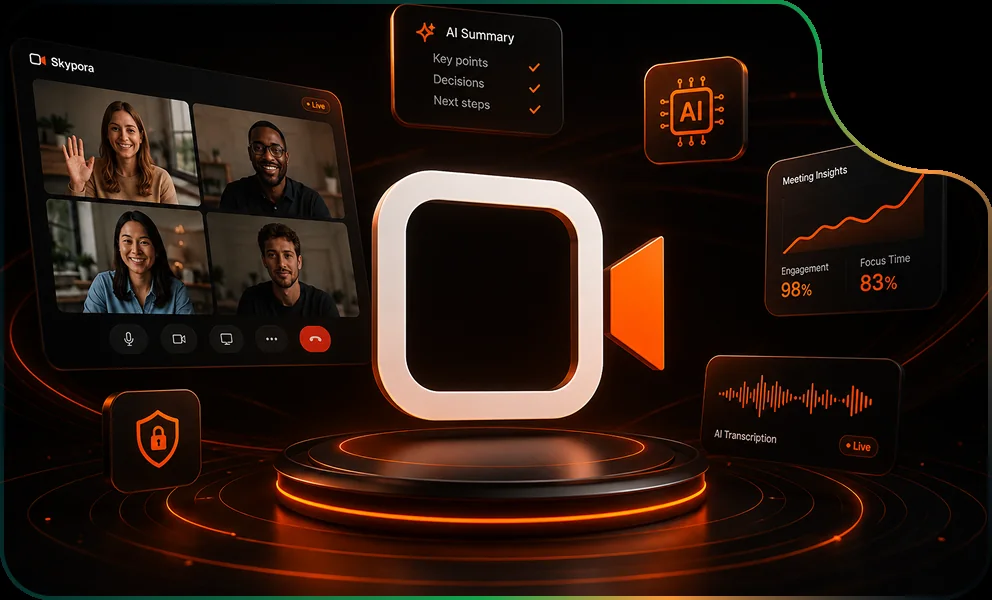
Skypora runs the video call in the browser, and its AI, Pora, sits in the room. Pora captions each person in their own language and keeps the notes. When the call ends it posts a recap, puts every action on a board with an owner and a date, and follows up until it is done.

Made forProduct teamsAgenciesTeams across languages

Runs onWeb

skypora.com
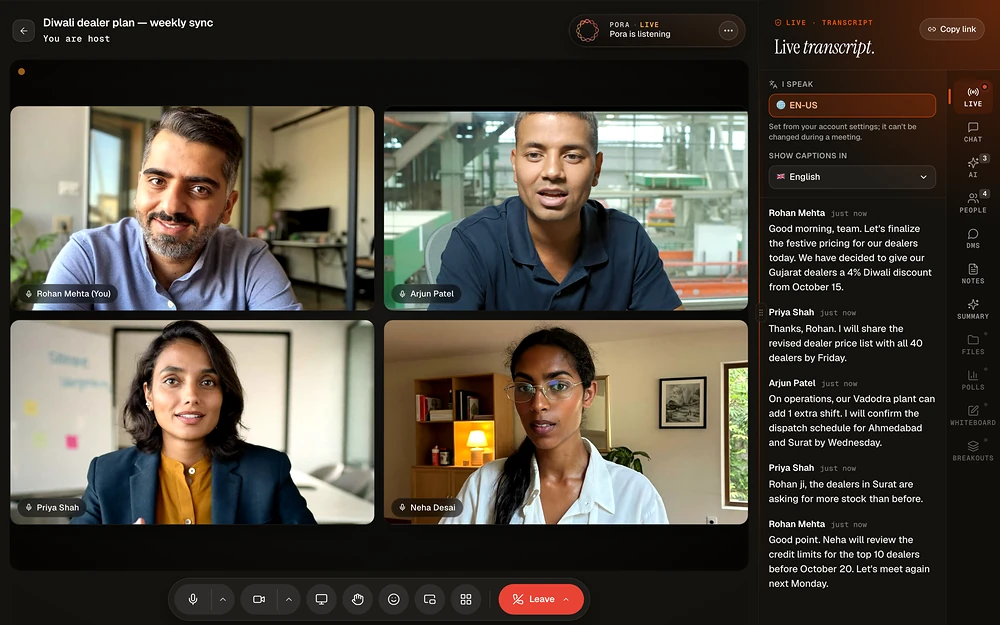
Skypora: Live call
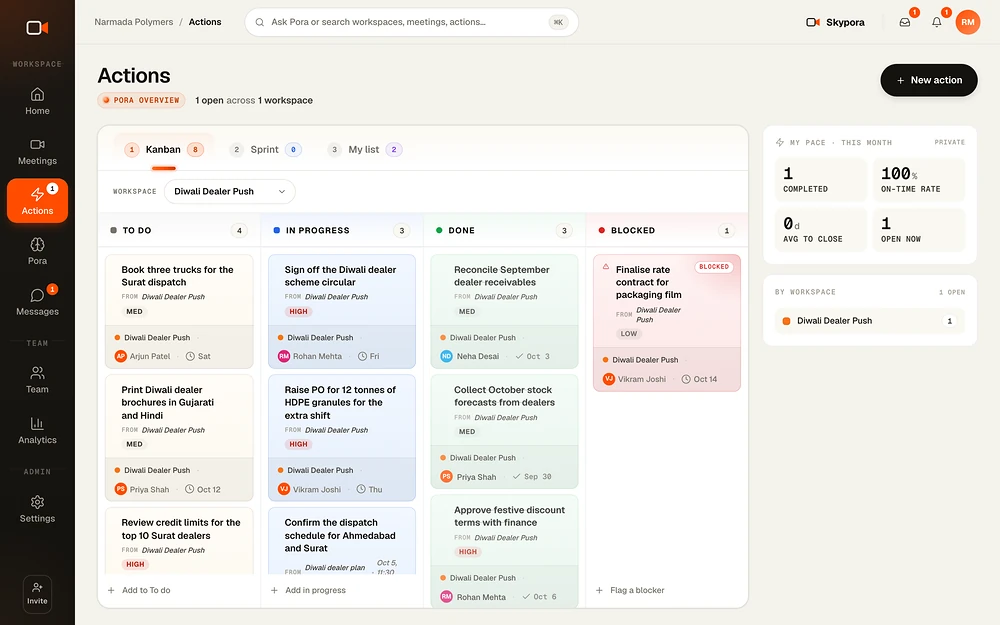
Skypora: Actions
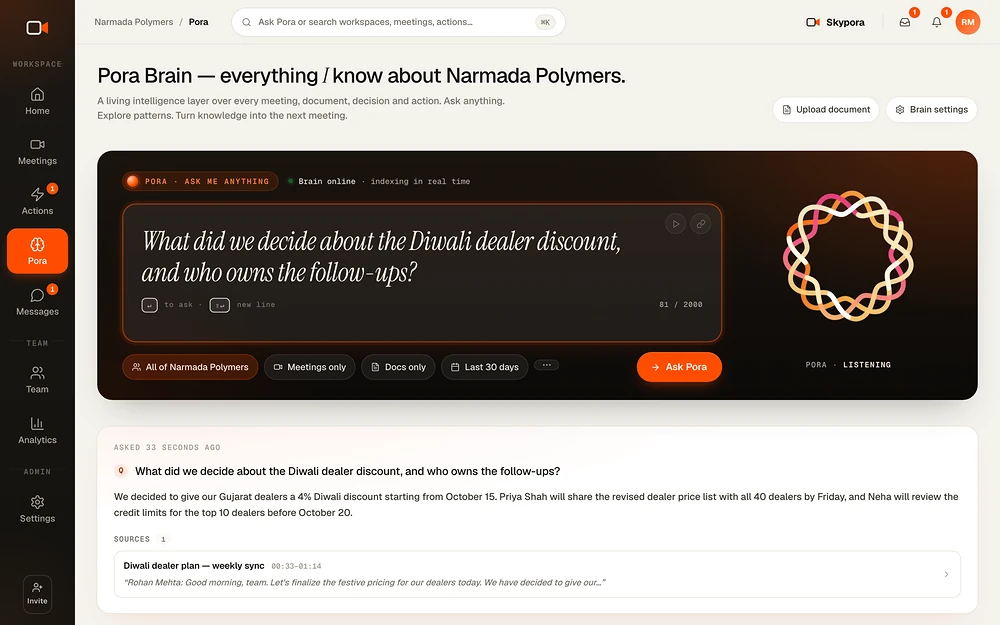
Skypora: Ask Pora
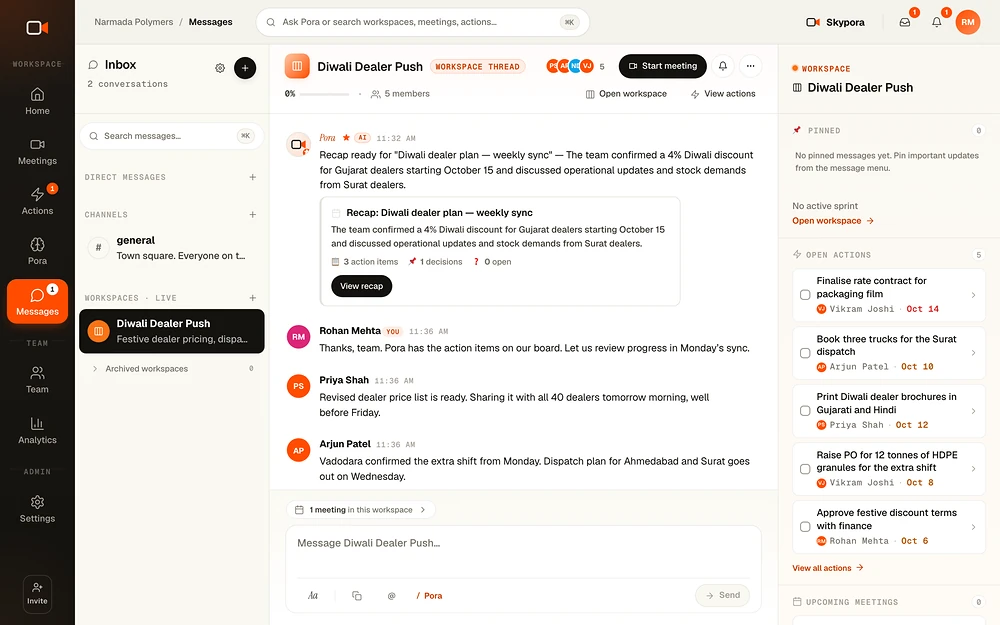
Skypora: Team chat

Pora sits in the call and captions each person in their own language.

Every decision lands on a board, with an owner and a date.

Ask what was decided, and Pora answers with the meeting it came from.

Follow-ups and nudges in team chat, linked to the meeting.

What changes · with Skypora

From how it wasto how it runs now

The difference a team feels in the first weeks, in plain words.

Someone takes notes instead of joining in
Pora keeps the notes, everyone talks
By Friday nobody remembers who owns what
Every action on a board, with an owner and a date
Late joiners ask what they missed
A catch-up card the moment they join
Guests stuck installing an app
Guests click the link and join in the browser
"What did we decide?" three weeks later
Ask Pora, and get the meeting it came from
The life of a meeting · 7 highlights

One meeting,from start to done

Scroll through one real weekly sync, from the briefing to the answer three weeks later.

9:55Before
Prepare

Walk in prepared.

The agenda, what happened last time and who is coming, before you join.

  • Templates for 1:1, standup and retro
  • Recurring meetings in a click
  • Invites with a calendar file
skypora.com/meetings
InternalDiwali dealer plan · weekly syncMonday, 10:00 · every week
Agenda
  1. 1Festive pricing for Gujarat dealers
  2. 2Dispatch for Ahmedabad and Surat
  3. 3Credit limits for the top dealers
Last time

The revised dealer price list was approved in draft.

From last Monday's sync
4 invited · you hostJoin now
Added to Google CalendarA reminder 15 minutes before
10:00Join
Guests

A knock, not a download.

Guests click the link and join from the browser. The host decides who comes in.

  • No install, no account for guests
  • A lobby the host controls
  • Passcodes when you need them
skypora.com/room/diwali-sync
KKiran Desai
Kiran Desai from Shree Traderswants to join · the doorbell just rang
DeclineAdmit
10:04During
Captions

Everyone in their own language.

Each person reads live captions in the language they pick. Hindi, Gujarati and English mixed in one call are each recognised.

  • Live captions and a running transcript
  • Each person picks their caption language
  • Pora keeps the minutes as you talk
skypora.com/room/diwali-sync
Diwali dealer plan · weekly syncPora · livePora is listening
English

Rohan: We have decided to give our Gujarat dealers a 4% Diwali discount from October 15.

हिन्दी

रोहन: हमने गुजरात के डीलरों को 15 अक्टूबर से 4% दिवाली छूट देने का फैसला किया है।

10:20During
Catch up

Late, not lost.

Join late and a card tells you what was decided and who owns what. Not a wall of transcript.

  • Decisions and owners, not minutes
  • Ready the moment you join
  • Pora rewrites the notes every minute
skypora.com/room/diwali-sync
You joined 16 minutes inHere is what you missed
  • decision4% Diwali discount for Gujarat dealers from 15 October
  • actionPriya sends the revised price list by Friday
  • actionArjun confirms the Ahmedabad and Surat dispatch by Wednesday

Pora has been listening since 10:00

10:42After
Recap

The meeting distills itself.

When the call ends, Pora posts the recap: decisions, actions with owners and dates, and open questions.

  • Posted to team chat and emailed
  • Review it before it goes out
  • Copy it as Markdown for Slack or Notion
skypora.com/meetings/diwali-sync/recap
Transcript

Rohan We have decided to give our Gujarat dealers a 4% Diwali discount from October 15.

Priya I will share the revised dealer price list with all 40 dealers by Friday.

Arjun I will confirm the dispatch schedule for Ahmedabad and Surat by Wednesday.

Rohan Neha will review the credit limits for the top 10 dealers before October 20.

Open questionDo the Surat dealers get the same terms as Ahmedabad?
ExtractedAssignedOwned
decision4% Diwali discount from 15 October
actionShare the revised price listFri
actionConfirm the dispatch scheduleWed
actionReview credit limits, top 10 dealers20 Oct

Recap posted to #dealer-push and emailed to 4 people

ThuFollow-up
Actions

Pora follows up.

Every action sits on the board, and Pora nudges in team chat before a deadline slips.

  • Kanban, sprint and my list
  • Pora asks before it guesses an owner
  • Blocked? Schedule a meeting to unblock it
skypora.com/actions
Narmada Polymers · Diwali Dealer Push
Actions
KanbanSprintMy list
To do3
Print dealer brochures in Gujarati and HindiDetected by Pora
Oct 12MED
Book three trucks for the Surat dispatchDetected by Pora
SatMED
Review credit limits for Surat dealersDetected by Pora
Oct 18
In progress2
Review credit limits, top 10 dealersDetected by Pora
20 OctHIGH
Raise a PO for 12 tonnes of granulesDetected by Pora
ThuHIGH
Blocked1
Finalise packaging film rateDetected by Pora
Oct 14LOW
Done3
Confirm the dispatch scheduleDetected by Pora
Wed
Approve festive discount termsDetected by Pora
Oct 6
Share the revised price listDetected by Pora
FriHIGH
My pace · this month
100%on time
3done this week
1blocked
Pora · #dealer-push

Price list is due tomorrow, Priya. Still on track?

3 wksLater
Ask Pora

Ask the team's memory.

Ask what was decided, and Pora answers with the meeting it came from.

  • Searches meetings and your documents
  • Answers in the language you ask in
  • Flags topics that keep coming back
skypora.com/pora
What did we decide about the Diwali discount?
AllMeetingsDecisionsActionsDocuments
Pora is searching your meetings
Pora

4% for Gujarat dealers from 15 October. Rohan decided it in the weekly sync, and Priya sent the revised price list that Friday.

Diwali dealer plan · Mon · 10:07Price list · done Fri
See all 103 features96 live · 7 soon
22

Video room

  • Browser video calls: HD calls in any browser. Guests need no install and no account.
  • Three layouts: speaker view, grid view or sidebar view, switched with one click or a key.
  • Screen share: present your screen to the room.
  • On-device backgrounds: blur, soft blur or a picture behind you. Curated and custom presets are processed on your own computer.
  • Auto-framing: the camera keeps you centred.
  • Noise suppression: background noise is filtered out of your mic.
  • Device picker: switch camera, microphone or speaker mid-call.
  • Instant self-view: you see yourself while the call is still connecting.
  • Reactions and raise hand: six quick emoji float up the stage, and you can raise a hand.
  • Pin and floating tile: pin a speaker, or keep a floating picture-in-picture tile.
  • Network quality chip: shows how good your connection is.
  • In-call chat and DMs: room chat plus private messages to one person.
  • Private and group notes: private notes that autosave, and a shared live document with everyone's cursors.
  • Highlights: mark moments in the meeting, then jump back to them later by timestamp.
  • Keyboard shortcuts: M for mic, V for camera, G for grid, S for speaker, ? for the list.
  • Resizable side panel: drag the right rail wider or narrower.
  • Phone-friendly room: portrait camera on phones and a caption strip at the bottom.
  • Camera and mic help: clear steps to unblock a denied permission, plus a retry.
  • "Still there?" guard: warns you when you are alone, then ends empty calls on its own.
  • Mid-call recovery: drops reconnect without losing your place.
  • Files, polls, whiteboard and breakouts: files, polls, a whiteboard and breakout rooms inside the call.Soon
  • Cloud recording: record the call to the cloud.Soon
11

Hosts in control

  • Admission rules: choose who gets in.
  • Lobby knock cards: a soft doorbell rings and a card appears, and the host admits or declines. Guests see a branded waiting card.
  • Passcodes: lock a meeting with a code.
  • Moderation: the host can do the following, each with a confirm step.
  • Meeting roles: invite people as co-host, presenter or attendee.
  • Join options: set each of these per meeting.
  • Domain restriction and verification: prove you own your email domain, then limit sign-ins to it.
  • Audit log: see who changed what in the workspace.
  • Admin actions: suspend or reinstate a user, or force-end any meeting.
  • Idle sign-out: after 30 idle minutes you get a countdown, then you are signed out.
  • Encryption: data is encrypted in transit and at rest.
13

Scheduling

  • Instant or scheduled meetings: start now, or pick a date, time and timezone.
  • Recurring meetings: daily, weekly, every two weeks or monthly, with a preview of the next dates.
  • Templates and categories:
  • Agenda and invitees: write a description and agenda. Pick people by name or email, with recent invitees remembered.
  • Add to calendar: a Google Calendar link, or an.ics file for Apple and Outlook.
  • Google Calendar sync: Skypora meetings are pushed into your Google Calendar. This is one way only.
  • Reminders and invites: email invites, plus a reminder 15 minutes before.
  • Meetings page: three views: upcoming, past and a week calendar.
  • Meeting briefer: before a call, see the agenda, the last meeting on this topic, who is in the room and what to move forward.
  • Personal room: your own permanent link, such as skypora.com/yourname, which you can customise.
  • Join by link: paste any meeting or room link to jump in.
  • Booking links: a link people use to book time with you.Soon
  • Webinars: host a webinar for a large audience.Soon
09

Pora in the meeting

  • Pora joins the call: an animated ring shows whether Pora is listening, thinking or speaking.
  • Host control of Pora: the host can stop, resume or remove Pora.
  • Live captions: subtitles roll in like a broadcast as people talk.
  • Live transcript: a running transcript in the side panel, labelled by who spoke.
  • Your own caption language: each person picks a language. The list follows the live speech engine.
  • Mixed-language speech: Hindi, Gujarati and English in one call are each recognised.
  • Live auto-notes: Pora rewrites the running minutes about every minute.
  • Catch-up for late joiners: join late and a card tells you what you missed.
  • Ask Pora mid-call: ask a question and get an answer that names the speaker and the time.Soon
07

After the call

  • The recap: decisions, action items, open questions and highlights, ready minutes after the call.
  • Recap everywhere: the recap is posted into the workspace chat and emailed to attendees.
  • Past meeting page: everything about one meeting in one place.
  • Regenerate and review: re-run the summary, or review it before it goes out.
  • Export: copy the meeting as Markdown for Slack or Notion, or download the participant list as CSV.
  • Notes for guests: a guest can email the meeting notes to themselves after the call.
  • Recordings and AI Summaries pages: every recording and summary in one place.Soon
09

Actions and sprints

  • Actions from conversation: Pora creates each task with an owner and a due date, marked "Detected by Pora during a meeting".
  • Checks before it guesses: when Pora is unsure, or hears a name it cannot match, it asks you to verify.
  • Three views:
  • Drag and drop: move cards between columns.
  • Needs an owner: unclaimed tasks wait in a row. Anyone can take one, or assign it.
  • Blockers: flag a blocker, then "Schedule to unblock" opens a meeting with the task loaded.
  • Sprints: create a sprint and pull items in from the backlog. Unfinished work goes back to the backlog when you close it.
  • Focus and patterns: Pora gives you a daily focus, a team pattern bar and a teammate view.
  • Nudges: every 30 minutes Pora posts deadline warnings, pending-task reminders and sprint burndown into chat.
06

Pora Brain

  • Ask anything: plain-language questions across meetings and uploaded documents, with cited answers.
  • Filters: narrow the search to any of the following.
  • Team documents: upload txt, md or pdf files so Pora knows your policies and plans.
  • Pora noticed: Pora flags topics that are stuck, revisited or delayed, with a button to schedule a meeting about them.
  • Answers in your language: Pora replies in the language you asked in.
  • Recent searches: your recent questions are kept for quick reuse.
09

Messages

  • Channels, DMs and Pora: public and private channels, direct messages, and a DM with Pora.
  • The basics done right:
  • Rich composer: bold, lists and strikethrough.
  • Attachments: attach files to a message.Soon
  • /pora in any thread: type /pora and a question to get an answer in place.
  • Pora cards: recaps, new actions, deadlines, burndown and answers arrive as cards.
  • Linked work panel: beside a conversation you see sprint progress, open actions, upcoming meetings and shared files.
  • Workspaces: group meetings, actions and chat around a project.
  • Live delivery: messages travel over WebSocket, reconnect on their own, and are never sent twice.
05

Home and the morning brief

  • A home that grows with you: it moves from "Saying hello" on day one, to "Warming up", to the daily briefing.
  • Morning brief: today's meetings, open actions, unread messages and pending reviews, with a next-meeting button.
  • Day panels:
  • Side cards:
  • Notifications: a bell, an inbox and a notifications drawer.
12

Team, analytics, account

  • Team page: invite people one at a time or in bulk, with a personal note.
  • Live presence: see who is active right now and who is in a meeting, plus seven-day activity.
  • Member profiles: each person's meetings and follow-through stats.
  • Analytics: history length depends on the plan.
  • Sign-up: sign up with email and a code, or with Google. Work emails get a 14-day Business trial, and you are offered your team if your domain is already on Skypora.
  • Onboarding with Pora: connect your calendar, meet Pora and run your first meeting.
  • Pora preferences: set these for yourself, with workspace defaults.
  • Slack: meeting summaries post to a Slack channel through an incoming webhook.
  • Branding (Business): your logo, colour and brand name on invites.
  • Billing: Stripe checkout, billing portal, invoices and extra seats. The pricing cards can show founding-member prices.
  • API keys and docs (Business): create keys and read the public developer docs.
  • Feedback: send feedback, with an attachment, from inside the app.
Who it's for · 6 kinds of team

Made for teams thatdecide on calls

Each one hires Skypora for a different job.

Teams that meet every day

Stop losing decisions and stop writing minutes by hand.

Teams that run sprints

Actions from calls land straight on a Kanban and sprint board, with nobody retyping them.

Client-facing teams and agencies

Guests join from a browser without an account, the host runs the lobby, and invites can carry your brand.

Multilingual teams

Everyone reads live captions in their own language, including Hindi, Gujarati, Bengali, Tamil, Telugu and Marathi.

Team leads and founders

A morning brief, follow-through rates for the team and a map of the topics that keep coming up.

Developers

API keys on the Business plan, to create meetings and make join links from your own product.

How it works · 5 steps

From sign-upto the first recap

Work emails get 14 days of Business free.

  1. 01

    Sign up with your work email or Google

    You get 14 days of the Business plan, and Skypora offers to join your existing team if your domain is already there.

  2. 02

    Start or schedule a meeting

    Share the link. Guests click it and land in the room from any browser.

  3. 03

    Pora joins and listens

    Everyone reads live captions in their own language, Pora keeps running notes, and late joiners get a catch-up card.

  4. 04

    The call ends and the work begins

    The recap lands in your team chat and inbox, and every action sits on the board with an owner and a date.

  5. 05

    Pora follows up

    It nudges before deadlines, and weeks later it answers "what did we decide?" and links the meeting it came from.

Under the hood · what it stands on

Built to betrusted

Its own video layer
Skypora runs its own video servers in the US and Europe, and routes you to the nearest.
Live speech
Real-time speech recognition and translation, with a fallback engine.
On your device
Background blur and replacement run on your own computer.
Encrypted
In transit and at rest, with hashed passcodes. Pora must hear the call to caption it.
Hosts in control
Lobby, passcodes, roles, domain restriction and an audit log.
Chat that arrives
Messages travel over a live connection, reconnect on their own and are never sent twice.
Built by SanctumCloud · the same team

The servicesit proves

We designed, built and run Skypora. The same people do this work for clients.

Generative AI applications

Assistants that answer from your own data.

SaaS product engineering

From idea to a product people pay for.

Web applications

Fast, secure web apps that grow without a rewrite.

AWS development

Serverless and container systems on AWS, run well.

SkyporaBuilt by SanctumCloud

Want a productlike this one?